


|
PRODUCT INFORMATION PAGE: Honda Navigation (MapCare)
Two Convenient Ways to Update: 1) Full Map Update: USB Download 2) Home or Regional Update Wi-Fi Update*: Smaller coverage area that can be updated over Wi-Fi. Go to 'Navigation,' then 'Map Update' for options (*may not be available in all regions)
|
|||||||
|
INSTALLATION GUIDES:
-Full Installation Guide (English/French/Spanish): click here -TroubleShooting & FAQ Guide: click here
INSTALLATION GUIDES BY STEPS BELOW:
|
|
||||||
|
HELPFUL TIPS:
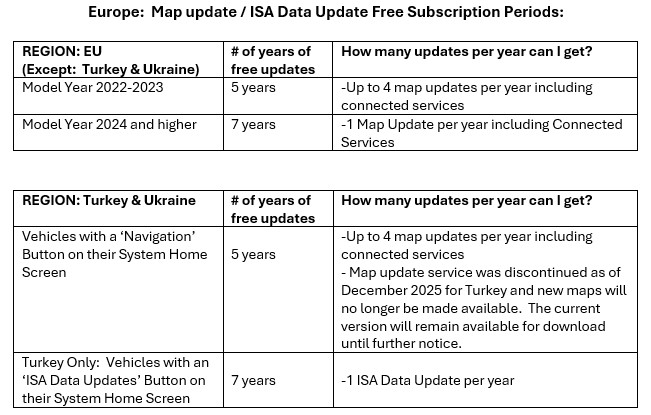
1) TroubleShooting & FAQ: click here Before reaching out to our Contact Center, please review the Troubleshooting guide 2) If your subscription shows an expiration date in the 1970's - chat/email our Contact Center with your VIN and we can fix this issue 3) Subscriptions include (if applicable by region): Real-Time Traffic:
Traffic visualization, including traffic flow and incidents
Traffic information and traffic events (description, distance, etc.)
Traffic Nearby and Along Route
Optimizes route calculation
POI Search by Phone Number:
Search for a Point of Interest (POI) by Phone Number
Updating your navigation system map by Wi-Fi or USB Drive:
•Home Region Update (Wi-Fi): Installs and updates home region map with a Wi-Fi connection
•Select Region Update (Wi-Fi): Installs and updates desired region map with a Wi-Fi connection
•Full Map Update (USB): Installs and updates full map with a USB flash drive
COMPATIBILITY: CIVIC 2022-2026 CR-V 2023-2026 E:Ny1 2023-2025 HR-V 2022-2026 ZR-V 2023-2026 |
|||||||